A Gmail Address with a Fake Name Won’t Cut it for Guest Posting

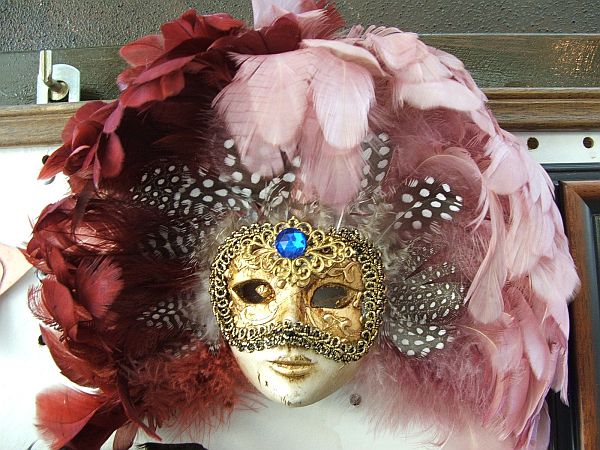
Venetian Mask - image from Wikimedia Commons, Creative Commons licence

(This is a temporary “Claim Code” entry for Technorati to verify my claim on ownership of this blog: 6MFG8NXDDUV2 – it will be removed once the blog has been verified.)
Venetian Mask - image from Wikimedia Commons, Creative Commons licenceIt seems like every other day I get an offer from someone to provide guest posts on this site.

Sometimes that turns out well, as for example with two new contributors, Joe Pawlikowski and Celina Connor.

Some are wanting to provide articles whose titles and content are at best only tangentially relevant to the group this blog is intended for – and that’s a pretty big group. These I decline as politely as I can.

But most of the messages have a distinct air of phoniness about them. These are usually sent from a gmail address whose user name looks like a real name but with a number. There is an artificial heartiness about the messages and there it no supporting information about the sender.

What the people obviously don’t get is that blogging and other elements of social media is about transparency and openness, not about masks and other forms of deviousness and trickery.

The dumbest of these basically anonymous messages recently began: “We’re interested in doing a guest post on ‘URL’”.

Whoops! They forgot to fill in the blank with the name of and link to my site.

Another had a photo of a woman, with a woman’s name, but from the Rapportive app I have installed I was able to see that the owner of the Gmail account appeared to be a man and indeed when I click on the LinkedIn profile link displayed there for that person it was indeed a man, whose various activities described on LinkedIn included “guest posting”. It was pretty clearly a case of a phony ID, not a bit of cyber cross-dressing. For the fun of it I sent a reply asking just which one of these identities was asking to be a guest contributor. Amazingly, the person replied (with the woman persona), offering a topic title.

Amusing? Yes, up till now. I believe I’m getting bored with this parade of nonsense and will from here on refrain from attempting to be polite to these time-wasters.

But I’m still interested in hearing from real people who have something worthwhile to offer and are ok with my guest posting guidelines.

And who understand and demonstrate transparency.

And as I really don’t have time to be to-ing and fro-ing with people who don’t seem to have a real identity behind the Gmail address, I’ve now added into the guidelines a requirement that people who want to guest post here must have a substantial LinkedIn profile, with a reasonable number of connections with other real people.

Image credit: Venetian mask, Verona, from Wikimedia Commons: Rinina25 & Twice25, Creative Commons


More Free Images for Your Blog Posts with Flickr and Creative Commons

Flickr logo

Flickr as a source of free images

Flickr logoThis post is a follow up on a post last week about finding free images to use for blog posts and presentations, where I focused on using Wordle images.

This post is about using images from the photo sharing site Flickr.

Now if you’ve used Flickr you might think a post on the subject would be an example of the old adage about teaching your grandmother to suck eggs.

But when it comes to using images from Flickr for blog posts or presentation decks, there are a few extra steps beyond going to Flickr.com and downloading images we like.

Because while all the images on Flickr can be copied or downloaded, there are copyright issues which govern how we can use specific images.

Creative Commons

Creative Commons CC BY license half screen shot

Fortunately for bloggers and presenters wanting to use images appropriately, Flickr provides the tools, under Advanced Search, to find an image with a Creative Commons license meets our needs.

Not everyone seems to understand that there is not just one “Creative Commons” license, as has been illustrated for me a couple of times when I asked someone if I could use an image for a specific purpose, say for a blog post, and got the response, “Sure, it’s Creative Commons”. As I explain below, just knowing it’s “Creative Commons” might not protect me from breaching the license terms.

The fact is, we need to be sure we are complying with the terms of the specific Creative Commons (CC) license attached to the specific  image we propose to use. The different licenses and their terms of use are explained here.

By the way, a caveat if one is necessary: I am not a lawyer, nor any kind of copyright specialist. I’m just sharing here what I know and how I understand it.

The three types of license I make use of are:

Creative Commons Attribution imageAttribution CC BY

This gives you the most scope for use, as long as you provide attribution to the owner. I usually do that at the end of the blog post or presentation.

Creative Commons Share Alike imageAttribution Share Alike CC BY_SA

This license lets you remix, tweak, and build upon the original work even for commercial purposes, as long as you credit the owner and license your new creations under the identical terms.

Creative Commons No Derivs imageAttribution No Derivatives CC BY_ND

This, as the name suggests, gives a narrower protection to the original image. For example, with this license in play I can’t crop an image, or add text to it. But if I just want to use the image as is, there is no problem with using one covered by this license.

The three other CC licenses are more restrictive if we want to use an image commercially. Does that mean I need the owner’s permission if I want to use an image so protected on a company blog? Just google “Creative Commons non commercial use” and you’ll see it’s a gray area. Personally, I don’t want to be holding up a blog post till I have checked with the image owner: so I don’t use images which come under any of the “NonCommercial” licenses.

There’s a Catch – or Two

As I said, I don’t like to hold up a blog post (or a presentation slide deck for that matter) to wait on permission to use an image, so even when I have found an image that has one of the three CC licenses but has other conditions, I don’t bother.

Getty Images + Flickr logosThe two other conditions that I’ve seen are:

  • where under the CC info there is also the Getty Images “g” symbol and some text requiring permission to use the  image is identified as being from Getty Images and you need to pay to use it
  • where the owner specifies that he or she is to be contacted for approval, prior to specific use

Even with those limitations, that usually still leaves me scope to find an image I can use.

Still to come: using Flickr Advanced Search to choose your images

In another post I’ll go through the process, step by step, for using Flickr’s Advanced Search to choose the images you want and then download them.